
HRSync People in focus. Processes in one place.
HRSync is a digital HR solution that brings leave, shifts, timesheets, payroll and employee processes together on one platform.
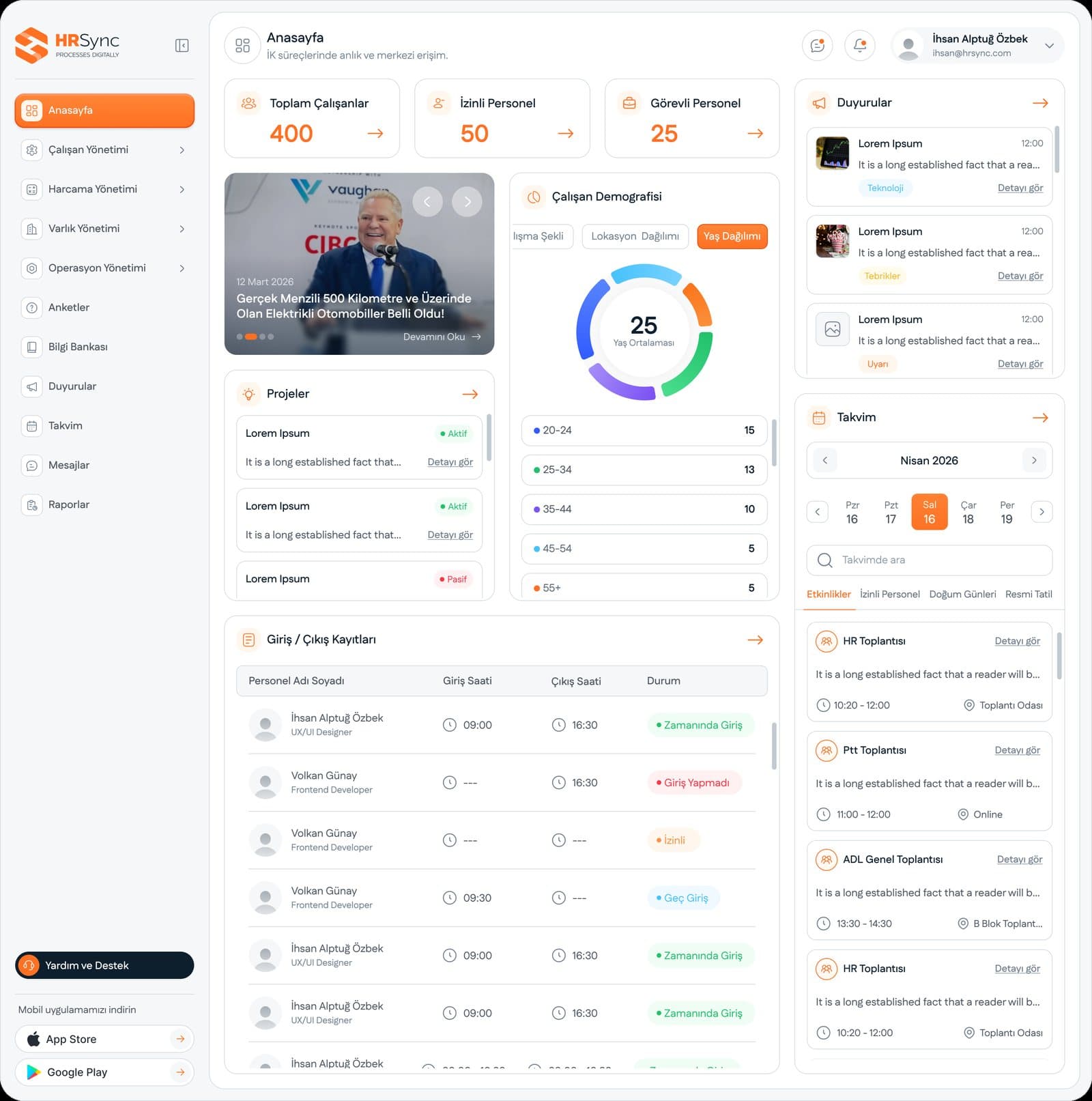
Product images are taken from the presentations in our promotional catalogue.
Who uses it
Run by human resources and administrative teams; employees and managers handle their own transactions in the browser or the mobile app.
What problem it solves
In traditional HR management, leave forms, timesheets and asset lists are kept in separate places, often in Excel. Daily work fragments, and miscalculated overtime is often noticed only once it reaches payroll. HRSync brings personnel data, leave and advance requests, attendance tracking, asset assignment and internal communication into one secure internal system, so the HR team reaches up-to-date records and reports from one place.
Who does what in HRSync
There are separate login panels for managers and staff. From office workers to blue-collar staff, and from a ten-person business to an organisation with thousands of employees, everyone uses the same simple interface.
HR team
Keeps personnel files digitally, calculates timesheets from the records at period end and runs payroll on those records. The organisation chart stays current in the same system.
Manager
Approves leave and advance requests with a single tap in the mobile app and sees the team's check-in and check-out status in real time. Because approval times are tracked in reports, the step that creates a bottleneck becomes visible.
Staff member
Submits leave and advance requests personally and sees their leave balance, payslip and announcements transparently. Takes part in surveys from the same platform.
Administrative affairs
Uses asset assignment records to track which employee holds which company asset; the record appears in the employee's file.
The parts of HRSync
Time and payroll
Leave and shifts are planned on the same calendar. Timesheets are recorded. Payroll runs on these records.
- Approved leave is reflected in the leave balance automatically.
- Overtime and break times are entered into the timesheet.
- The timesheet calculation underpins the period-end performance and productivity analysis.
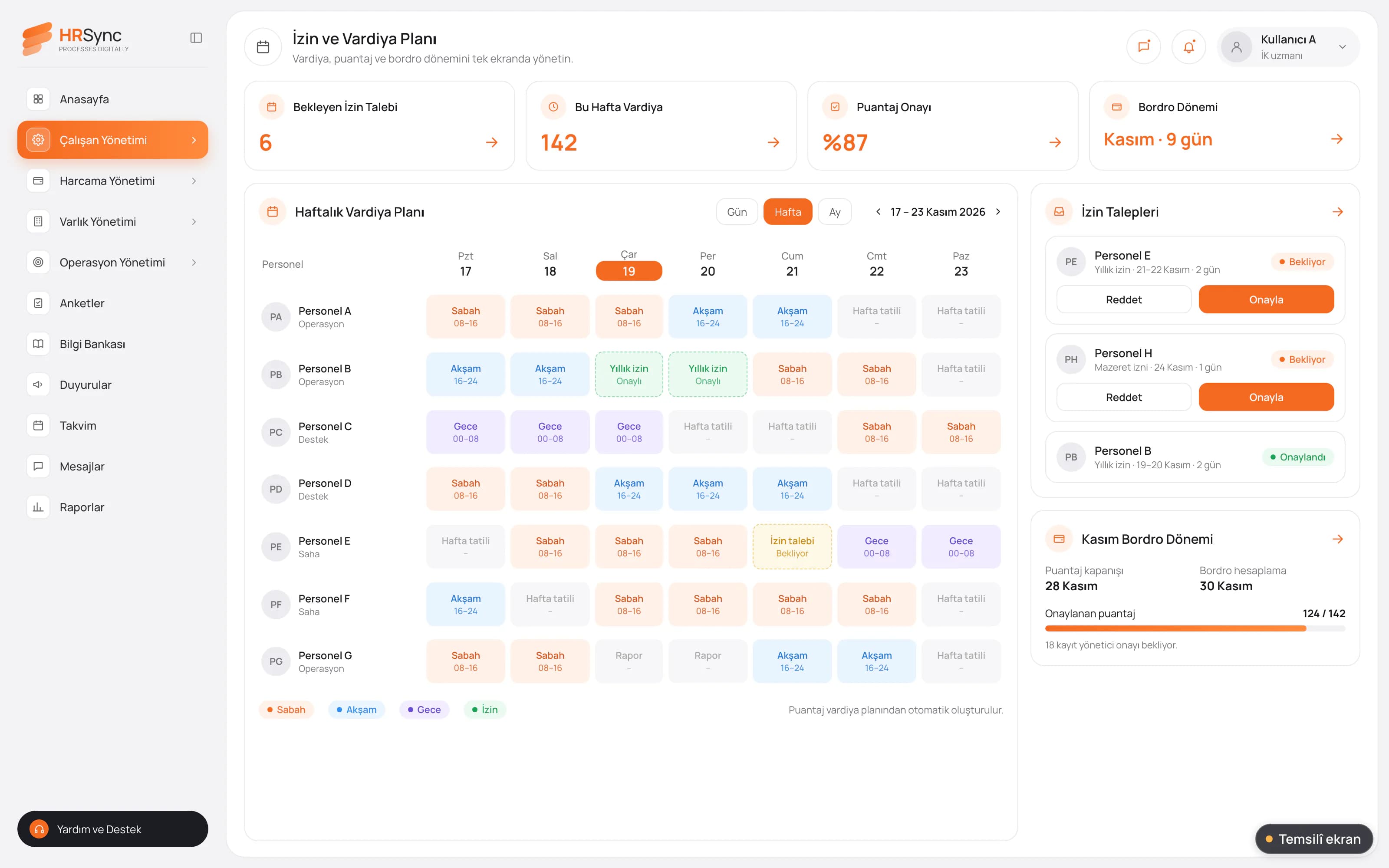
Illustrative screen Leave and shift calendar. Weekly shift grid, approval status of a leave request and timesheet summary. Employee experience
Performance periods and assigned assets are tracked per employee. Announcements and surveys reach employees from the same platform.
- Performance review rests on concrete data such as lateness rate, working time and goal completion.
- Internal messaging and the organisation chart are in the same system.
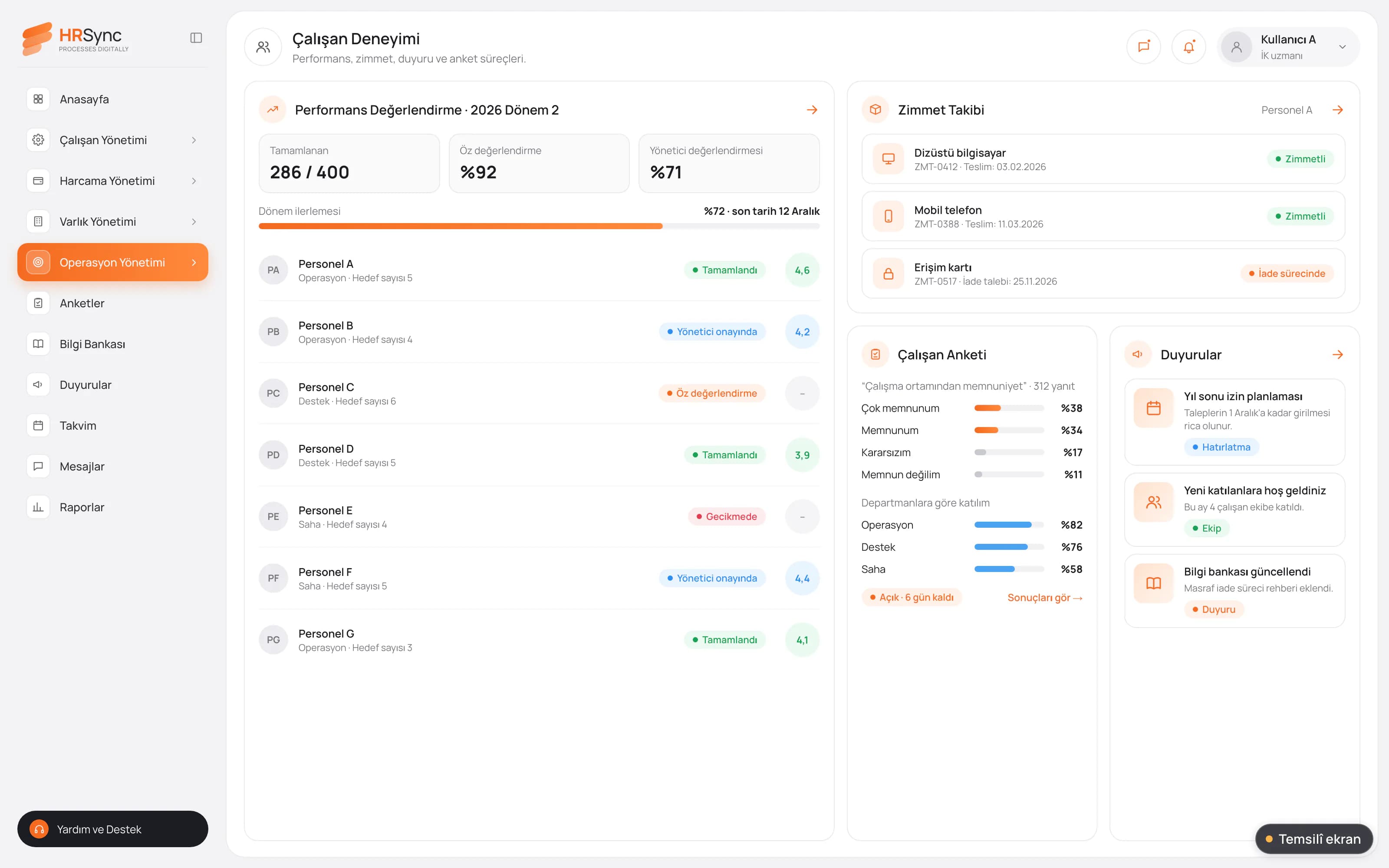
Illustrative screen Employee experience. Asset list, performance period, announcements and surveys. Management view
HR operations are reported. Processes are assessed together in a single view.
- Overtime cost by department
- Staff turnover rate
- Productivity trends
- Approval times by manager
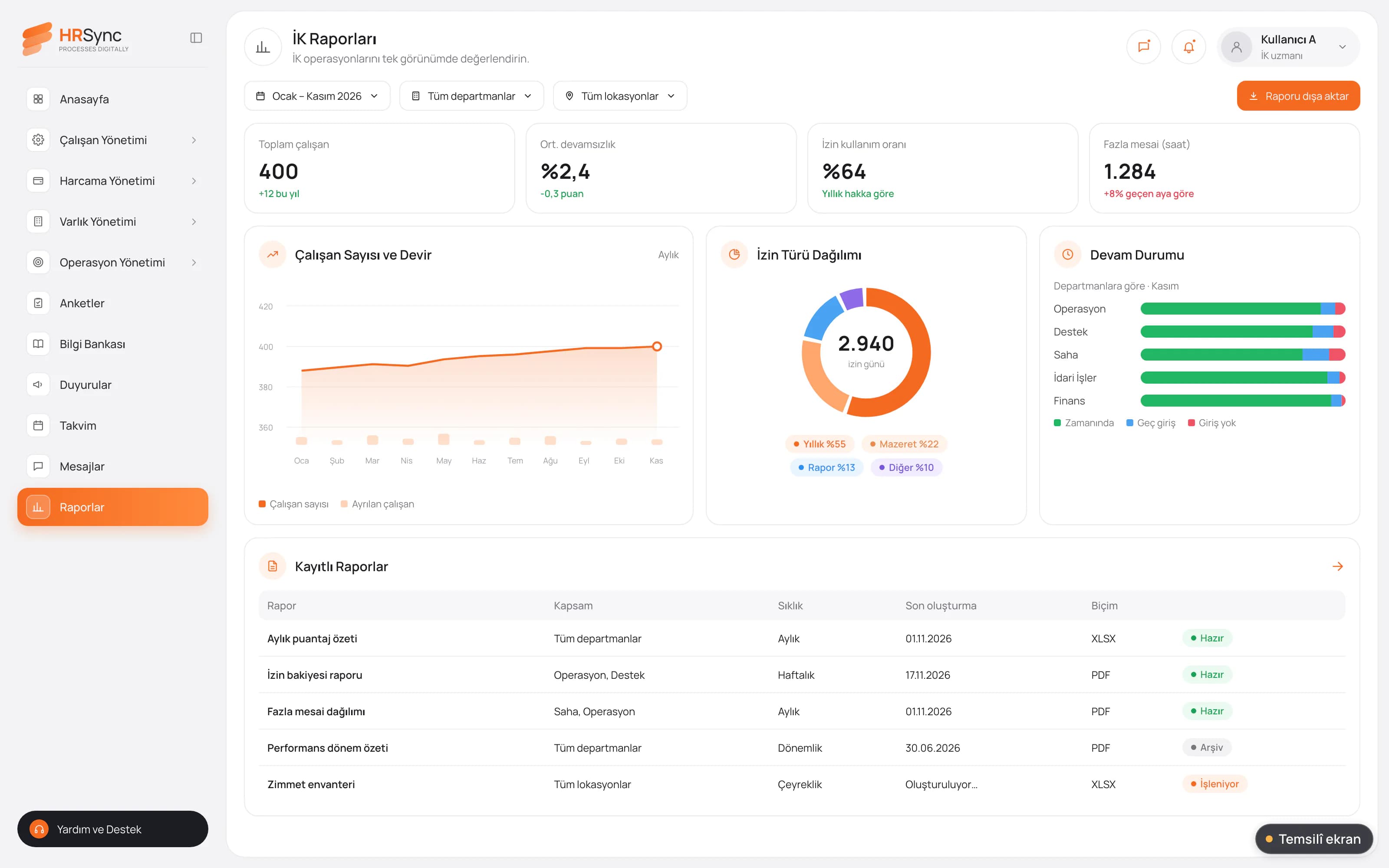
Illustrative screen HR reports. Process-based report list and period selection; charts use sample data.
Attendance tracking and PDKS
Records from the personnel attendance control system (PDKS) flow into HRSync. ADL's PDKS Plus can be installed on compatible devices the organisation already has; if there is no suitable device, ADL devices compatible with the system are used and card-based check-in starts right away.
- Automatic timesheets from the check-in and check-out records sent by devices
- A live view of staff attendance at every location
- Detailed period-end reports for the HR team
- PDKS connection with card access and turnstile systems
Personnel files and documents
Personnel files are digitised, ending piles of paper folders and lost forms. Documents are stored with the employee record, and with the e-signature connection the signing step can also run digitally.
- Digital personnel file management
- Document management system
- e-signature SDK integration
Shaped around the organisation
HRSync does not work like a rigid package; it is personalised to the organisation's own requirements and way of working and extended with additional modules. Setup starts quickly, without complex technical requirements.
Illustrative screens are prepared to explain what the product does; they contain no real institution, person or outcome data.
ERP, e-signature and work tools
HRSync works alongside the ERP, office and communication tools the organisation uses. Which connections are set up is decided in the project meeting.
ERP and accounting
- Logo
- Netsis
- SAP
The organisation's ERP and accounting systems.
E-signature
- e-signature SDK
For signing documents with an electronic signature.
Office and communication
- Google Workspace
- Microsoft 365
- Slack
The e-mail, calendar and messaging tools employees use every day.
Professional network
Attendance control
- PDKS Plus
ADL's personnel attendance control system; check-in and check-out data is transferred to timesheets.
How a timesheet period runs
- Shifts and leave are planned on the same calendar.
- Employees check in and out by scanning their card at a PDKS device.
- Leave and advance requests are sent from the mobile app and the manager approves them.
- At period end the timesheet is calculated from the records and payroll is run.
- Asset and performance records are updated and HR reports are produced.
Questions on setup, mobile and timesheets
Which tools does it offer for internal communication and collaboration?
Internal messaging, announcements, surveys and the organisation chart are built into HRSync. It also integrates with Google Workspace, Microsoft 365 and Slack.
Does the system work on mobile devices?
Yes. HRSync is available both in the browser and in the mobile app. Employees submit leave and advance requests from their phone and managers approve them from the same place.
How are staff check-ins and timesheets tracked?
Check-in and check-out records come from PDKS devices; PDKS Plus is installed on your existing compatible devices or on ADL's devices. Once the records reach HRSync, timesheets are generated automatically and period-end reports are prepared.
Which requests can employees submit through the system?
Leave and advance requests are submitted, approved and tracked in the system. Approved leave is reflected in the leave balance automatically.
Can company assets be tracked in the system?
Yes. Asset assignment tracking records which employee holds each asset, and it is followed per employee.
Do I have to use every module?
HRSync is personalised for each organisation. Which processes to start with and which additional modules to add is decided in the project meeting, based on the organisation's needs.
Let's evaluate HRSync together.
A 30-minute live demo of HRSync and a pilot plan for your team. Share your HR processes and the systems you use, and we will map out the scope together.
Let's talk